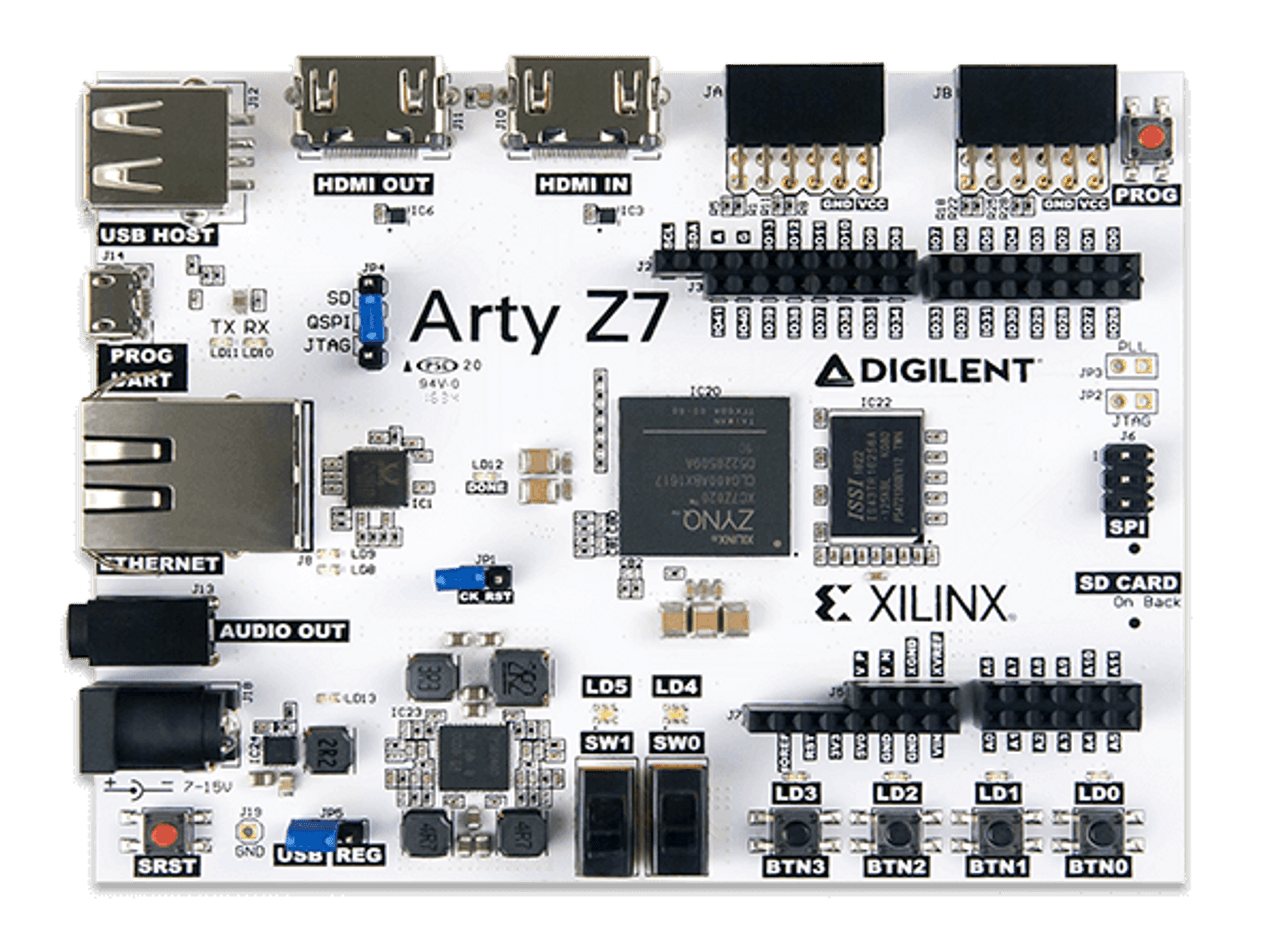
Arty Z7:APSOC ZYNQ-7000制造商和业余爱好者产品形象的开发委员会。
  • Arty Z7:APSOC ZYNQ-7000制造商和业余爱好者产品形象的开发委员会。
  • Top view product image of the Arty Z7: APSoC Zynq-7000 Development Board for Makers and Hobbyists.
  • Arty Z7的底部视图产品图像:APSOC ZYNQ-7000制造商和业余爱好者的开发委员会。

Arty Z7:Zynq-7000 SOC开发委员会

$ 199.00
(5个评论) Write a Review
Sku:
410-346-10

Arty Z7-20变体不再生产。一旦当前库存耗尽,它将退休。

Digilent FPGA/SOC板的Arty家族设计了多功能性和灵活性。有了普遍流行的Arduino™标题和多个PMOD™端口,Arty将是工具箱中最适合的FPGA/SOC板。

The Arty Z7 is a ready-to-use development platform designed around the Xilinx Zynq®-7000 System-on-a-chip (SoC) family. The Zynq®-7000 SoC family integrates the software programmability of an ARM®-based processor with the hardware programmability of an FPGA, enabling key analytics and hardware acceleration while integrating CPU, DSP, ASSP, and mixed signal functionality on a single device.

The Arty Z7 is supported by Xilinx's Vivado Design Suite, including the free WebPACK version. The SDSoC™ Development Environment provides a familiar embedded C/C++/OpenCL application development experience for heterogeneous Zynq® SoC deployment.

There are two variants of the Arty Z7: The Arty Z7-10 features the XC7Z010-1CLG400C, and the Arty Z7-20 features the larger XC7Z020-1CLG400C. There is a third option available, the Arty-Z7-20 with a Xilinx SDSoC voucher, which is recommended for those interested in video processing applications.

If your application does not require the processing system of an SoC, theArty A7, 或者Arty S7may be better options.

Guides and demos are available to help you get started quickly with the Arty Z7. These can be found through the支持材料tab.

Arty Z7-10 Arty Z7-20
FPGA部分 XC7Z010-1CLG400C XC7Z020-1CLG400C
Logic Cells 28,000 85,000
DSP切片 80 220
阻止RAM(MBITS) 2.1 4.9

  • Zynq处理器
    • 650MHz dual-core Cortex-A9 processor
    • DDR3内存控制器,具有8个DMA通道和4个高性能AXI3从属端口
    • High-bandwidth peripheral controllers: 1G Ethernet, USB 2.0, SDIO
    • Low-bandwidth peripheral controller: SPI, UART, CAN, I2C
    • Programmable from JTAG, Quad-SPI flash, and microSD card (Micro B USB电缆 不是包括)。
    • 可编程逻辑等效于Artix-7 FPGA
  • 记忆
    • 与16位总线512 mb DDR3 @ 1050 mbps
    • 16MB Quad-SPI Flash with factory programmed 48-bit globally unique EUI-48/64™ compatible identifier
    • microSD slot
  • 力量
    • 由USB或任何7V-15V外部电源供电
  • USB and Ethernet
    • Gigabit Ethernet PHY
    • USB-JTAG Programming circuitry
    • USB-UART桥
    • USB OTG PHY (supports host only)
  • 音频和视频
    • HDMI接收器端口(输入)
    • HDMI source port (output)
    • PWM driven mono audio output with 3.5mm jack
  • 开关,按钮和LED
    • 4push-buttons
    • 2slide switches
    • 4个LED
    • 2个RGB LED
  • Expansion Connectors
    • 两个标准PMOD端口
      • 16总计FPGA I/O
  • arduino/chipkit屏蔽型连接器
    • Z7-20和26 FPGA Digital I/O最多可容纳49个FPGA数字I/O
    • 6个单端0-3.3V模拟输入XADC
    • 4Differential 0-1.0V Analog inputs to XADC
  • Arty Z7: SoC Development Board (Micro B USB电缆不是包括)
  • Digilent纸板包装与防护泡沫

为了为您的Arty Z7创建和修改设计,您可以使用Xilinx的Vivado Design Suite。Vivado是一种用于HDL设计合成和分析的软件。

Xilinx SDSOC开发环境为异构Zynq®SOC部署提供了熟悉的嵌入式C ++/OpenCL应用程序开发经验。Arty Z7-20可以购买SDSOC开发环境的代金券。该凭证不包括对Vivado Design Suite的访问,但是Arty Z7的两个变体都由Vivado Design Suite的免费WebPack版本支持。

快速找到您需要开始的东西,并减少眨眼的平均时间。

All product support including documentation, projects, and the Digilent Forum can be accessed through the product resource center.

资源中心

快速链接

Reference Manual
Schematic

5个评论Hide ReviewsShow Reviews

  • 5
    Arty Z7:Zynq-7000 SOC开发委员会

    Posted by Eric Brombaugh on 7th Feb 2022

    出色的功能,出色的价格。

  • 3
    伟大的硬件...

    Posted by Digilent Customer on 22nd Sep 2020

    But lacking up to date project support and documentation.

  • 4
    很棒的重新引入FPGA Tech;需要安装解决方案

    由Zack发表于2018年2月24日

    As the others have said it is really easy to get started with this board. I was able to get both Petalinux and Ubuntu 16.04 to boot from an SD card (the former with a RAM filesystem using an example made by Digilent on Github, the latter with a persistent filesystem based on guide-blogs I found online). I had some trouble getting a UARTLite Xilinx IP core to show-up in Ubuntu's /dev/ directory initially, but it turned out that I was simply forgetting to export a hardware definition. The Petalinux build tools take care of all the hard work linking your FPGA logic to Linux, and seems to work just fine if you're using the Petalinux OS itself or something like Ubuntu. Fair warning: This thing can get very warm. At 70F ambient temperature this board, with only a basic "blink" FPGA bitstream and the Petalinux RAM FS from Digilent, my laser thermometer reported this thing reaching a steady-state temperature of 125F! I was able to significantly lower the temp to 85F-90F with a small heatsink and DC fan from Microcenter (powered off the 5V rail). While probably not an absolute must-have I'd personally recommend it. Since I've gotten Ubuntu working and solved by UARTLite troubles I've had no problems updating the FGPA logic and tinkering with the OS. I've been using Vivado 2017.04 on Windows 10 (x64), and i've been my Petalinux tools from a VirtualBox VM of Ubuntu 16.04. I have some random Micro-SD Card reader that Ubuntu can access via VirtualBox. Additionally, here's a super-handy guide I followed for getting Ubuntu running: https://medium.com/developments-and-implementations-on-zynq-7000-ap/install-ubuntu-16-04-lts-on-zynq-zc702-using-petalinux-2016-4-e1da902eaff7 Oh, and as another review stated this thing has no on-board mounting holes of any sort. It has four small rubber feet, but that's it. That's perhaps the only downside to this board, but it's far from a deal-breaker if you're looking for a solid Zynq development platform that doesn't take-up much room.

  • 5
    简单的设置和出色的工作

    罗宾·哈坎森(Robin Hakanson)发表于2018年2月17日

    Arty Z7-20真的很容易使用。板效果很好,并且有很多易于使用的测试IO(例如按钮和LED)开始测试。有关如何开始使用Digilent给出的董事会工作的教程真的很容易遵循,并为您提供了足够的信息,以了解如何从FPGA和SW设计的角度从您自己进步。

  • 4
    价格出色的董事会,但需要安装孔!

    Posted by Josh on 15th Jun 2017

    I have managed to get Ubuntu 16.04 running on the Arty Z7-20. All hardware appears to work reliably. The only complaint that I have, is that the board has no mounting holes. How would I mount this board onto a robot? Makers and Hobbyists NEED the ability to mount the board, otherwise it cannot be used for real embedded projects, because it is just a loose board/fire hazard. Again, for the price, it is a great board!

Baidu