


Digilent现在是测量计算的骄傲分销商Corporation(MCC) DAQ and data logging products. MCC is a leading supplier of data acquisition solutions that are easy-to-use, easy-to-integrate, and easy-to-support.
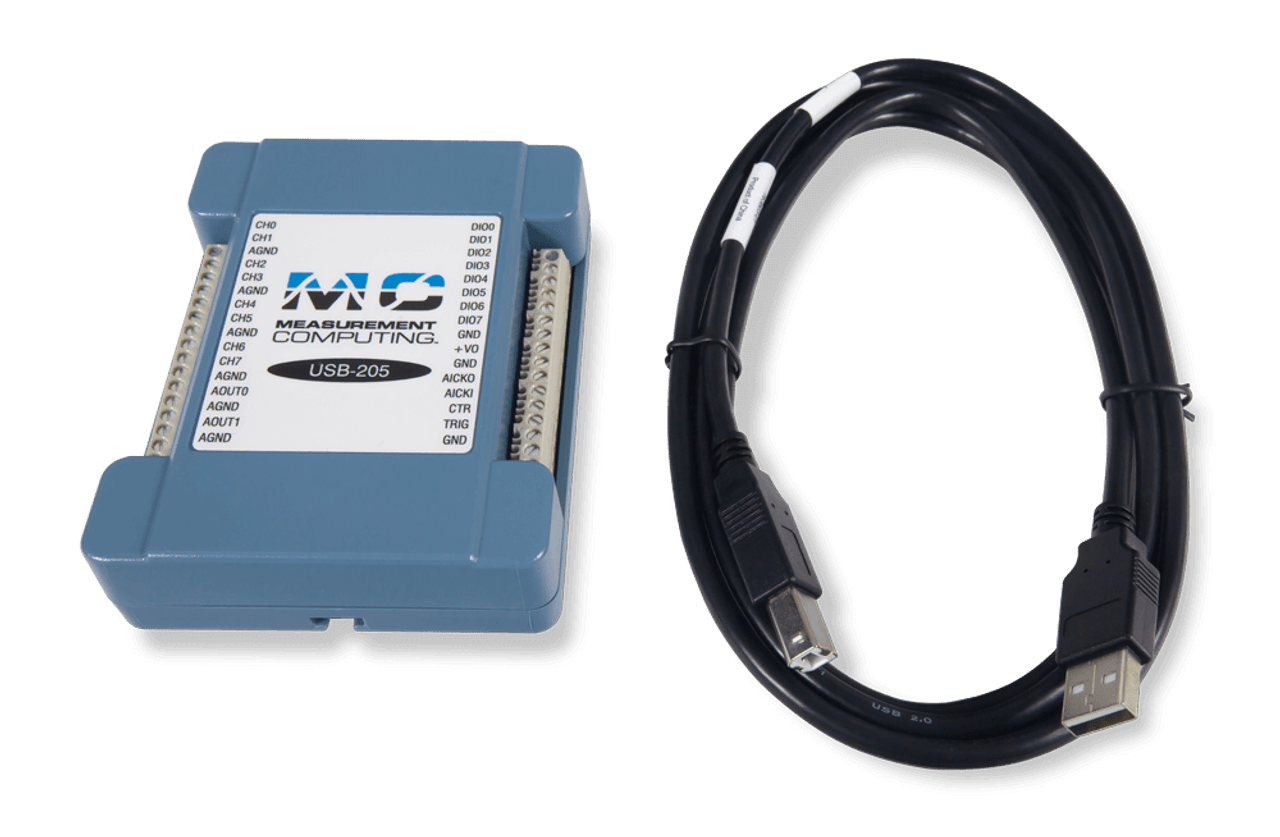
MCC USB-202和USB-205是低成本,12位的多功能DAQ设备,旨在通用数据采集应用程序。每个设备都具有八个SE模拟电压输入,两个模拟输出,八个数字I/O和一个计数器输入。
USB-202 features a 100 kS/s sample rate.
USB-205 features a 500 kS/s sample rate.
Software support includes DAQami, an optional out-of-the-box application for data logging, visualization, and signal generation. Data can be viewed in real-time or post-acquisition on user-configurable displays. Drivers are included for the most popular applications and programming languages including Visual C++®, Visual C#®, Visual Basic®。NET, DASYLab®,Labview™,Matlab®, Linux®, and Python™。
OEM, board-only versions of the USB-202 and USB-1205 with header connectors instead of screw terminals are available and can be ordereddirectly from MCC。
- 八个SE模拟输入
- 12位分辨率
- USB-202: 100 kS/s sample rate
- USB-205:500 ks/s样本率
- +/-10 V input range
- Two analog outputs
- 八个数字I/O
- 一个32位事件计数器输入
- 外部起搏器I/O
- No external power required
- 产品合规:
- HTC:8471.80.9000
- ECCN:EAR99
- USB-202或USB-205
- USB电缆
- 打印ed insert: DAQami software quick start
- MCC包装组件/泡沫等
优先考虑使用易用性和灵活性,MCC为最受欢迎的编程语言和应用程序提供现成的软件以及驱动程序。
开箱即用的软件包括用于数据记录,可视化和信号生成的DAQAMI。为了获得更全面和可定制的体验,Dasylab®提供实时分析和控制,以及在不编程的情况下创建自定义应用程序的能力。
为了最大程度的自定义,可视觉C ++包括驱动程序®, Visual C#®, Visual Basic®。NET, LabVIEW™,Matlab®, Linux®, and Python™。
开箱即用软件:daqami-可选的数据采集伴侣软件用于获取数据和生成信号 DAQAMI是一个开箱即用的应用程序,用于数据记录,可视化和信号生成。可以在用户可配置的显示器上实时查看数据。DAQAMI是交互式测试,数据记录和开发应用程序的理想选择,可运行几分钟或几天。 下载并安装DAQAMI,然后尝试30天的功能功能软件。30天后,除数据记录和数据导出外,所有功能都将继续可用。可以通过购买软件来解锁数据记录和数据导出功能。 Supported Operating Systems: Windows®11/10/8/7/Vista®,32位或64位 English, Chinese, and German language support. 达卡米can purchased directly from MCC for$49。 |
无需编程的自定义应用程序:dasylab®-可选的基于图标的数据采集,图形,控制和分析软件 Dasylab是一个可选的软件包,可提供实时分析,控制以及在不编程的情况下创建自定义应用程序的能力。Dasylab非常适合需要比Daqami提供的功能更多的用户。 Supported Operating Systems: Windows®11/10/8/7. Dasylab可以直接从MCC购买$499。 |
Programming and Driver Support -包括
MCC programming and driver support is extensive and features comprehensive libraries and example programs for the most popular applications and programming languages including Visual C++®, Visual C#®, Visual Basic®。NET, LabVIEW™,Matlab®, Linux®, and Python™。
了解有关MCC编程和驱动程序支持的更多信息下载编程和驱动程序支持
要了解有关完整软件生态系统的更多信息,请访问MCC软件页面。